Torly.ai · May 18, 2026
How to Craft an Investor-Day Style Pitch Deck for Your UK Innovator Visa with AI
Discover how Torly.ai’s Pitch Deck Creation Tool builds a professional, compliant investor-style presentation for your UK Innovator Visa application in minutes.


From Startup Idea to Investor-Day Ready Presentation
You’ve got a killer idea, backed by passion and technical prowess. Now it’s time to package it like a pro. A slick, investor-day style pitch deck can turn an Innovator Visa application into a persuasive visa endorsement presentation that ticks every Home Office and endorsing body box. No fluff. Just clarity, coherence and a narrative that hooks.
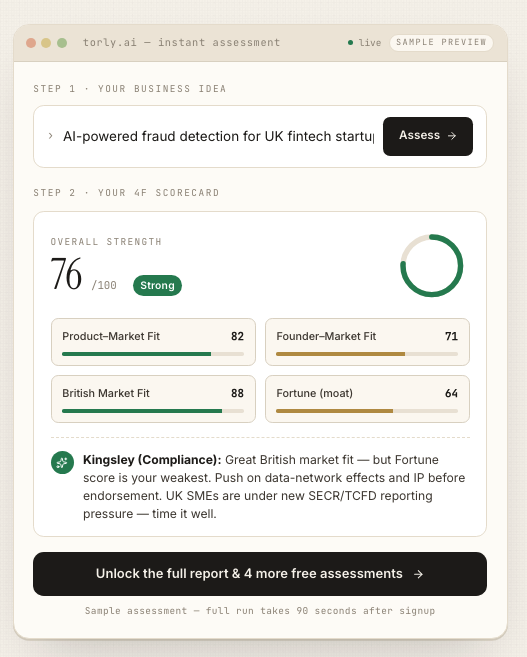
With Torly.ai at your side, you don’t need to wrestle with slide layouts or guess which data matters most. The AI-powered Innovator Founder Visa readiness platform guides you through every slide—eligibility checks, business idea qualification, gap analysis and tailored next steps. Ready to nail your visa endorsement presentation? AI-Powered UK Innovator Visa Endorsement Presentation Assistant will help you craft investor-ready slides in minutes.
Planning Your Investor-Day Style Pitch Deck
Before you even open PowerPoint, sketch out your story. Think of each slide as a chapter in a thriller: you’re setting up the conflict, unveiling the hero (your solution), and building tension with market stats and traction. A clear roadmap prevents rabbit holes—and boring decks.
Key planning steps:
– Define your core message in one sentence.
– List out must-have data points: market size, growth rates, traction metrics.
– Map each slide to a narrative arc: problem, solution, market, business model, team, ask.
– Set a 10–12 slide limit. Investors skim—brevity wins.
Benefits of a Data-Driven Approach
- Cuts down guesswork.
- Ensures nothing critical is missing.
- Boosts confidence in front of endorsing bodies.
Slide-by-Slide Breakdown
1. Title & Vision
First impressions count. Your title slide must look crisp and state:
– Company name and logo.
– Tagline summarising your innovation.
– Presenter name and date.
Tip: Add a subtle background pattern or muted brand colour—avoid clutter.
2. The Problem
Be ruthless. Paint a vivid picture of the pain point:
– Who’s affected?
– How big is the problem?
– Real-life examples or quotes.
Use a simple graphic or icon to illustrate scale. No dense paragraphs.
3. Your Solution
Show, don’t just tell. Include:
– A visual mock-up or product screenshot.
– Three bullet points on benefits.
– What makes it truly innovative.
Example: “Our AI-driven health tracker predicts flares 24 hours in advance—reducing hospital admissions by 30%.”
4. Market Opportunity
Home Office panels love numbers. Break down:
– Total Addressable Market (TAM).
– Serviceable Available Market (SAM).
– Serviceable Obtainable Market (SOM).
Visualise it with a concentric circle chart or bar graph. Keep labels clear.
5. Business Model & Go-to-Market
Explain how you’ll make money:
– Pricing strategy.
– Sales channels.
– Distribution partners.
A table works here. Compare your model to a known benchmark.
6. Traction & Validation
Proof is persuasive. Include:
– Pilot results or user metrics.
– Revenue figures.
– Letters of intent or early partnerships.
Use logos of recognised partners when possible.
7. Team & Advisors
Highlight credentials:
– Founders’ backgrounds.
– Key hires.
– Industry advisors.
Bullet out relevant experience—keep it tight.
8. Financial Projections & Ask
Show realistic forecasts for 3–5 years:
– Revenue.
– Gross margin.
– Net burn rate.
End with your funding or endorsement ask. State precisely what you need and why.
Design and Delivery Tips
A great pitch deck is half design, half delivery. Few secrets:
– Limit text to 6 lines per slide.
– Use consistent fonts and colours.
– Speak to the slides—don’t read them.
Rehearse with colleagues. Time your talk. Aim for 15 minutes—plus 5 minutes Q&A.
Leveraging Torly.ai for Effortless Deck Creation
Messy decks slow you down. Torly.ai streamlines the entire process:
– Automated slide templates tailored to Innovator Visa criteria.
– AI-driven content suggestions for each section.
– Real-time feedback on clarity and compliance.
Once your draft is ready, export it in PowerPoint or PDF with one click. Need to tweak the business model slide? The TorlyAI BP Builder APP offers a dedicated module to refine financials and GTM strategy. Download the TorlyAI Desktop APP
Mid-article reminder: A polished, investor-day style pitch can be the difference between a visa endorsement and a request for more info. Use Torly.ai to stay on track—every slide, every data point, every word counts. AI-Powered Visa Endorsement Presentation Tool for Innovator Visa
Common Pitfalls to Avoid
- Information overload: Crowded slides lose attention.
- Over-promising: Be ambitious but realistic.
- Inconsistent branding: Shifts in colours or fonts look amateur.
- Vague asks: Spell out exactly what endorsement or funds you need.
Use bullet checklists. Run each slide through Torly.ai’s compliance checker to flag gaps.
Putting It All Together
Crafting an investor-day style deck for your UK Innovator Visa doesn’t have to be painful. With a clear narrative, focused data, and polished design, you’ll impress both endorsing bodies and potential investors. And you’ll save hours thanks to Torly.ai’s AI-powered tools, from business idea qualification to gap analysis and slide generation.
Ready to transform your application into an unbeatable visa endorsement presentation? Build Your Endorsement Application with 6 AI Agents
Conclusion
An investor-day style pitch deck is more than pretty slides. It’s your story, your data and your ask—stitched together in a compelling way. Follow this slide-by-slide guide, lean on Torly.ai for AI-driven insights, and you’ll head into your Innovator Visa application with confidence.
For personalised support, instant compliance checks, and a template library built for endorsing bodies, try Torly.ai today. Streamline your visa endorsement presentation with AI